

Cisco-opplæring

Insoft Services er en av få opplæringsleverandører i EMEAR som tilbyr hele spekteret av Cisco-sertifisering og spesialisert teknologiopplæring.

Les mer

Cisco Sertifisering

Opplev en blandet læringstilnærming som kombinerer det beste av instruktørledet opplæring og e-læring i eget tempo for å hjelpe deg med å forberede deg til sertifiseringseksamen.

Les mer

Cisco Learning Credits

Cisco Learning Credits (CLC) er forhåndsbetalte opplæringskuponger innløst direkte med Cisco som gjør planleggingen for suksessen din enklere når du kjøper Cisco-produkter og -tjenester.

Les mer

Etterutdanning

Cisco Continuing Education Program tilbyr alle aktive sertifiseringsinnehavere fleksible alternativer for å resertifisere ved å fullføre en rekke kvalifiserte opplæringselementer.

Les mer

Cisco Digital Learning

Sertifiserte ansatte er verdsatte eiendeler. Utforsk Ciscos offisielle digitale læringsbibliotek for å utdanne deg gjennom innspilte økter.

Les mer

Cisco Business Enablement

Cisco Business Enablement Partner Program fokuserer på å skjerpe forretningsferdighetene til Cisco Channel Partners og kunder.

Les mer

Cisco opplæringskatalog

Les mer

Fortinet Sertifisering

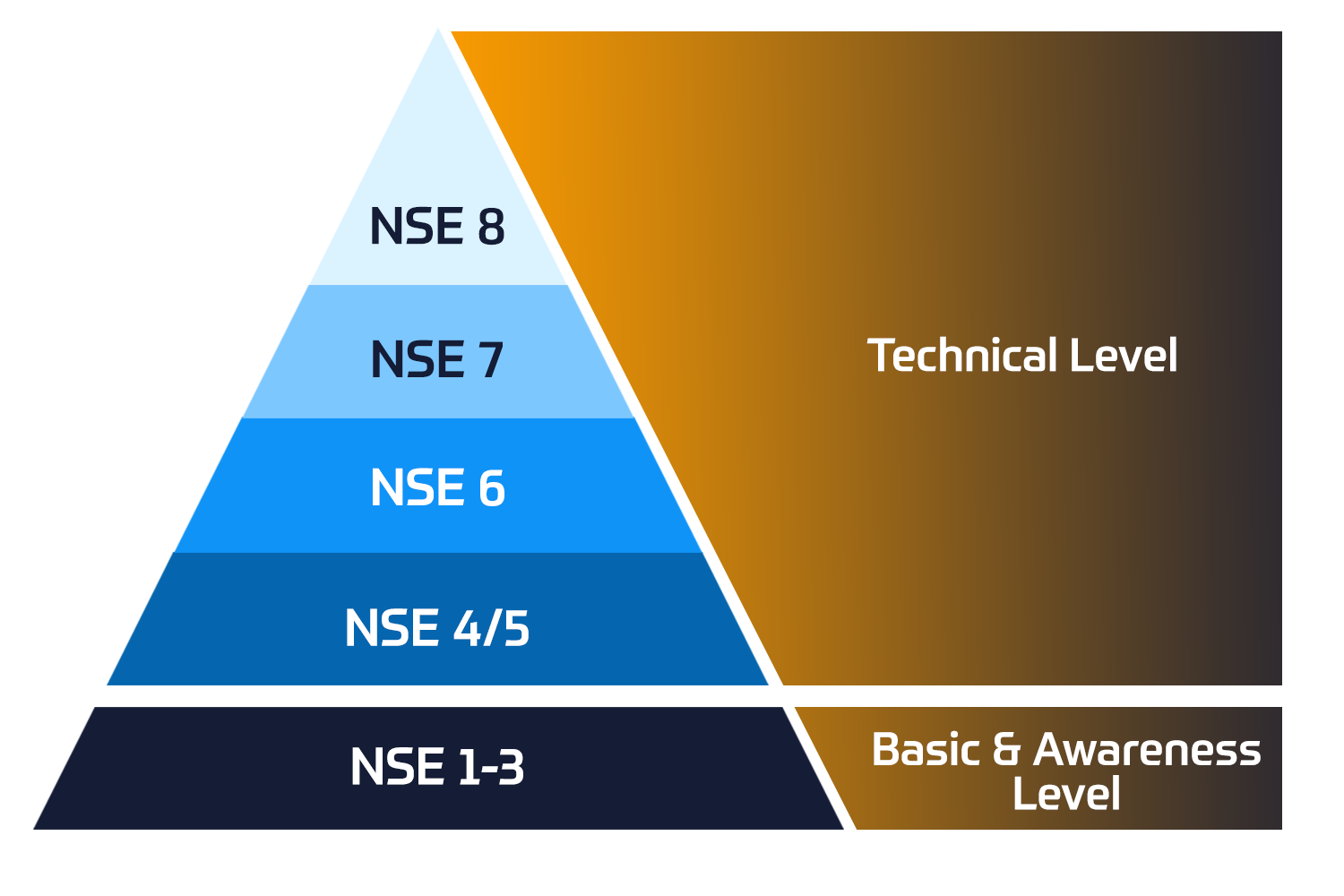
Fortinet Network Security Expert (NSE)-programmet er et opplærings- og sertifiseringsprogram på åtte nivåer for å lære ingeniører om nettverkssikkerheten for Fortinet FW-ferdigheter og -erfaring.

Tekniske kurs


Fortinet-opplæring

Insoft er anerkjent som Fortinet Autorisert Opplæringssenter på utvalgte steder i EMEA.

Les mer

Fortinet opplæringskatalog

Utforsk et bredt utvalg av Fortinet Schedule på tvers av forskjellige land så vel som online kurs.

Les mer

ATC-status

Sjekk atc-statusen vår på tvers av utvalgte land i Europa.

Les mer

Pakker for Fortinet-tjenester

Insoft Services har utviklet en spesifikk løsning for å effektivisere og forenkle prosessen med å installere eller migrere til Fortinet-produkter.

Les mer

AWS-opplæring

Opplæringen inkluderer laboratorier i eget tempo for praktisk AWS-praksis i virkelige scenarier, slik at du kan lære i ditt eget tempo, i klassen, på jobben eller online.

Tekniske kurs


Extreme-opplæring

Lær eksepsjonell kunnskap og ferdigheter i ekstreme nettverk.

Les mer

Teknisk sertifisering

Vi tilbyr omfattende læreplan over tekniske kompetanseferdigheter om sertifiseringsprestasjonen.

Les mer

Extreme opplæringskatalog

Tekniske kurs

ATP-akkreditering

Som autorisert opplæringspartner (ATP) sørger Insoft Services for at du får de høyeste utdanningsstandardene som er tilgjengelige.

Les mer

Løsninger og tjenester

Vi tilbyr innovativ og avansert støtte for design, implementering og optimalisering av IT-løsninger. Vår kundebase inkluderer noen av de største Telcos globalt.

Les mer

Globalt anerkjent team av sertifiserte eksperter hjelper deg med å gjøre en jevnere overgang med våre forhåndsdefinerte konsulent-, installasjons- og migrasjonspakker for et bredt spekter av Fortinet-produkter.


Om oss

Insoft Tilbyr autoriserte opplærings- og konsulenttjenester for utvalgte IP-leverandører. Finn ut hvordan vi revolusjonerer bransjen.

Les mer


  • +47 23 96 21 03
  • FortiMail Workspace Security Administrator

    Duration
    1 Dager (8 hours/day)
    2 Dager (half day sessions)
    Delivery
    (Online Og På stedet)
    Price
    Pris på forespørsel

    In this course, you will learn how to onboard and protect Google Workspace and Microsoft 365 services. You will learn about organizations and multi-tenancy, and learn how to view and filter scans, configure scan controls, and analyze verdicts. You will also learn how to implement browser security and protection for collaboration applications.

    Product Versions:

    • FortiMail Workspace Security 26

    Exam:

    • This course prepares you for the NSE6 - FortiMail Workspace Security Administrator exam.

    Associated Certification:

    After completing this course, you will be able to:

    • Explain FortiMail Workspace Security
    • Describe FortiMail Workspace licenses
    • Configure Google Workspace
    • Configure Microsoft 365
    • Configure additional email services
    • Configure administrator users and profiles
    • Configure VIP users
    • Configure banners
    • Describe organizational hierarchy
    • Configure an organization
    • Describe organization types
    • Manage organizations
    • Describe the precedence of allowlists and blocklists
    • Configure allowlists and blocklists
    • Configure email alerts
    • View audit logs
    • Monitor service status and feature updates
    • View and filter scans
    • Configure and generate periodic reports
    • View detected incidents
    • Manage FortiMail Workspace Security events
    • Configure remote logging
    • Manage FortiMail Browser Security
    • Deploy and manage extensions
    • Configure and manage policies
    • Configure advanced features
    • Integrate channels
    • Integrate EDR tools
    • Troubleshoot scans
    • Analyze error messages
    • Troubleshoot the browser extension
    • Introduction and Onboarding
    • System Settings
    • Workspace Security
    • Browser Security
    • Integrating Channels and Troubleshooting

    Security professionals involved in the day-to-day administration of a FortiMail Workspace Security platform should attend this course.

    You must have a basic understanding of network and email security concepts.

    In this course, you will learn how to onboard and protect Google Workspace and Microsoft 365 services. You will learn about organizations and multi-tenancy, and learn how to view and filter scans, configure scan controls, and analyze verdicts. You will also learn how to implement browser security and protection for collaboration applications.

    Product Versions:

    • FortiMail Workspace Security 26

    Exam:

    • This course prepares you for the NSE6 - FortiMail Workspace Security Administrator exam.

    Associated Certification:

    After completing this course, you will be able to:

    • Explain FortiMail Workspace Security
    • Describe FortiMail Workspace licenses
    • Configure Google Workspace
    • Configure Microsoft 365
    • Configure additional email services
    • Configure administrator users and profiles
    • Configure VIP users
    • Configure banners
    • Describe organizational hierarchy
    • Configure an organization
    • Describe organization types
    • Manage organizations
    • Describe the precedence of allowlists and blocklists
    • Configure allowlists and blocklists
    • Configure email alerts
    • View audit logs
    • Monitor service status and feature updates
    • View and filter scans
    • Configure and generate periodic reports
    • View detected incidents
    • Manage FortiMail Workspace Security events
    • Configure remote logging
    • Manage FortiMail Browser Security
    • Deploy and manage extensions
    • Configure and manage policies
    • Configure advanced features
    • Integrate channels
    • Integrate EDR tools
    • Troubleshoot scans
    • Analyze error messages
    • Troubleshoot the browser extension
    • Introduction and Onboarding
    • System Settings
    • Workspace Security
    • Browser Security
    • Integrating Channels and Troubleshooting

    Security professionals involved in the day-to-day administration of a FortiMail Workspace Security platform should attend this course.

    You must have a basic understanding of network and email security concepts.

      Datoer
    • ` 24 Aug, 2026
    • ` 21 Sep, 2026
    • ` 19 Oct, 2026
    • ` 16 Nov, 2026
    • ` 14 Dec, 2026
    • ` 11 Jan, 2027

    Follow Up Courses

    Filtrer
    • 2 Dager

      24 Aug - 25 Aug, 2026

      21 Sep - 22 Sep, 2026

      19 Oct - 20 Oct, 2026

      16 Nov - 17 Nov, 2026

      14 Dec - 15 Dec, 2026

      11 Jan - 12 Jan, 2027

      Price on Request
      Book Now
    • 2 Dager

      10 Aug - 11 Aug, 2026

      7 Sep - 8 Sep, 2026

      5 Oct - 6 Oct, 2026

      2 Nov - 3 Nov, 2026

      30 Nov - 1 Dec, 2026

      28 Dec - 29 Dec, 2026

      Price on Request
      Book Now
    • 2 Dager

      17 Aug - 18 Aug, 2026

      14 Sep - 15 Sep, 2026

      12 Oct - 13 Oct, 2026

      9 Nov - 10 Nov, 2026

      7 Dec - 8 Dec, 2026

      4 Jan - 5 Jan, 2027

      Price on Request
      Book Now
    • 2 Dager

      17 Aug - 18 Aug, 2026

      14 Sep - 15 Sep, 2026

      12 Oct - 13 Oct, 2026

      9 Nov - 10 Nov, 2026

      7 Dec - 8 Dec, 2026

      4 Jan - 5 Jan, 2027

      Price on Request
      Book Now
    • 2 Dager

      17 Aug - 18 Aug, 2026

      14 Sep - 15 Sep, 2026

      12 Oct - 13 Oct, 2026

      9 Nov - 10 Nov, 2026

      7 Dec - 8 Dec, 2026

      4 Jan - 5 Jan, 2027

      Price on Request
      Book Now
    • 1 Dag

      24 Aug, 2026

      21 Sep, 2026

      19 Oct, 2026

      16 Nov, 2026

      14 Dec, 2026

      11 Jan, 2027

      Price on Request
      Book Now
    • 2 Dager

      17 Aug - 18 Aug, 2026

      14 Sep - 15 Sep, 2026

      12 Oct - 13 Oct, 2026

      9 Nov - 10 Nov, 2026

      7 Dec - 8 Dec, 2026

      4 Jan - 5 Jan, 2027

      Price on Request
      Book Now
    • 2 Dager

      24 Aug - 25 Aug, 2026

      21 Sep - 22 Sep, 2026

      19 Oct - 20 Oct, 2026

      16 Nov - 17 Nov, 2026

      14 Dec - 15 Dec, 2026

      11 Jan - 12 Jan, 2027

      Price on Request
      Book Now

    Know someone who´d be interested in this course?
    Let them know...

    Use the hashtag #InsoftLearning to talk about this course and find students like you on social media.