

Cisco-opplæring

Insoft Services er en av få opplæringsleverandører i EMEAR som tilbyr hele spekteret av Cisco-sertifisering og spesialisert teknologiopplæring.

Les mer

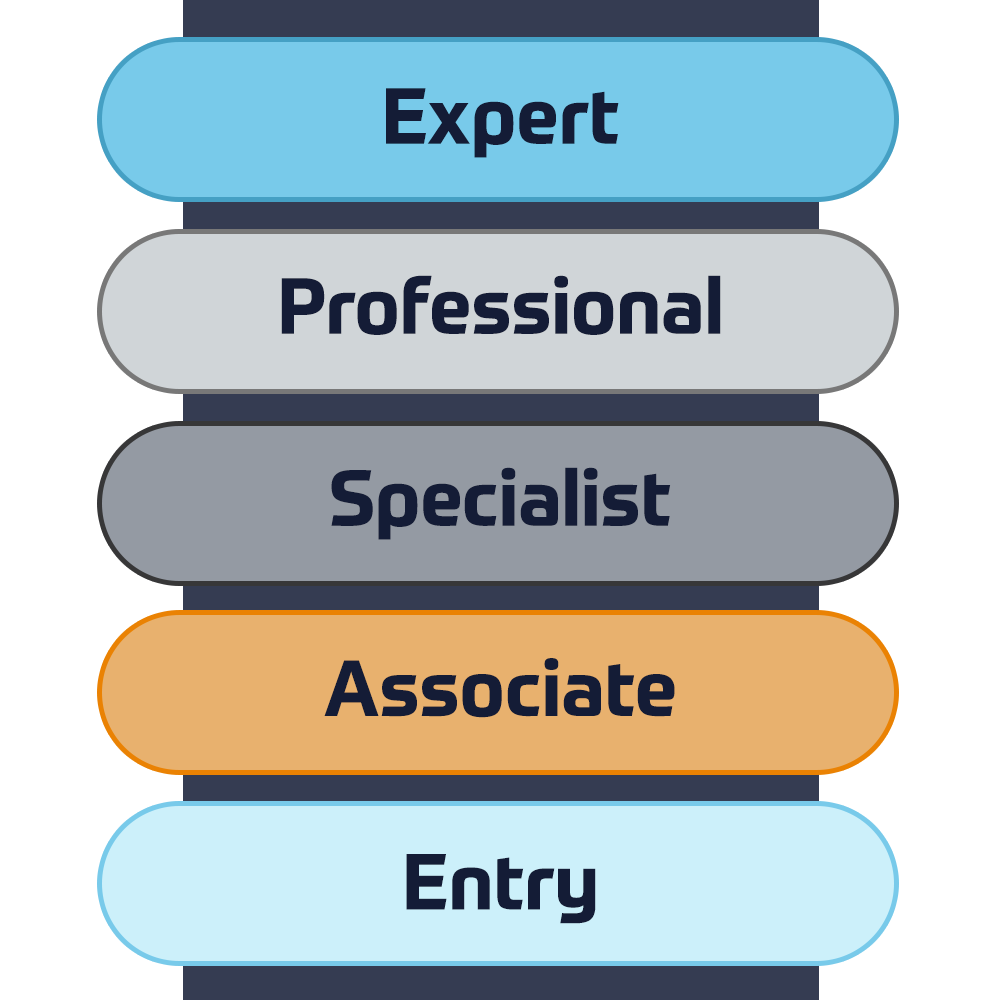
Cisco Sertifisering

Opplev en blandet læringstilnærming som kombinerer det beste av instruktørledet opplæring og e-læring i eget tempo for å hjelpe deg med å forberede deg til sertifiseringseksamen.

Les mer

Cisco Learning Credits

Cisco Learning Credits (CLC) er forhåndsbetalte opplæringskuponger innløst direkte med Cisco som gjør planleggingen for suksessen din enklere når du kjøper Cisco-produkter og -tjenester.

Les mer
Etterutdanning

Cisco Continuing Education Program tilbyr alle aktive sertifiseringsinnehavere fleksible alternativer for å resertifisere ved å fullføre en rekke kvalifiserte opplæringselementer.

Les mer

Cisco Digital Learning

Sertifiserte ansatte er verdsatte eiendeler. Utforsk Ciscos offisielle digitale læringsbibliotek for å utdanne deg gjennom innspilte økter.

Les mer

Cisco Business Enablement

Cisco Business Enablement Partner Program fokuserer på å skjerpe forretningsferdighetene til Cisco Channel Partners og kunder.

Les mer
Cisco opplæringskatalog

Les mer

Fortinet Sertifisering

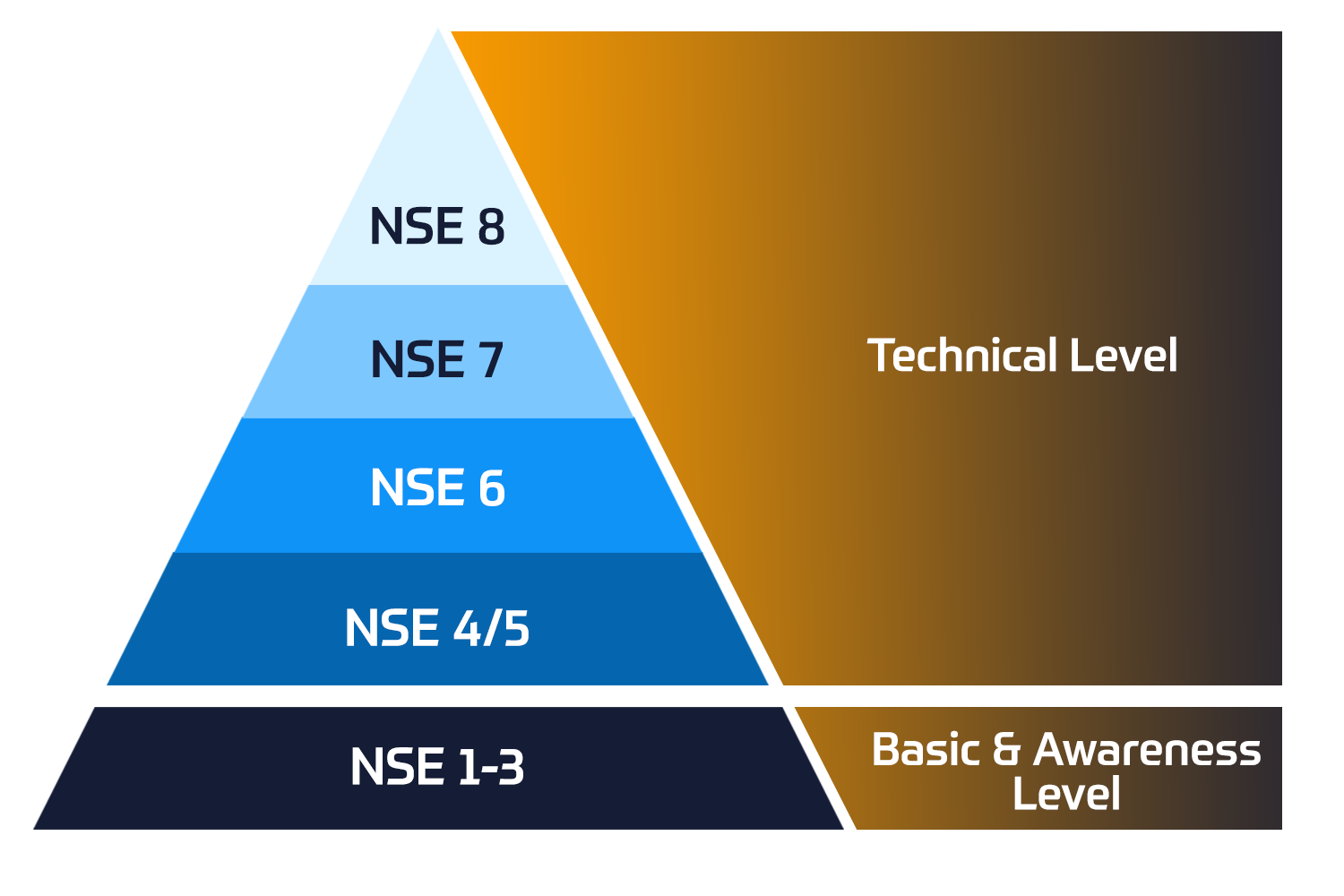
Fortinet Network Security Expert (NSE)-programmet er et opplærings- og sertifiseringsprogram på åtte nivåer for å lære ingeniører om nettverkssikkerheten for Fortinet FW-ferdigheter og -erfaring.

Tekniske kurs


Fortinet-opplæring

Insoft er anerkjent som Fortinet Autorisert Opplæringssenter på utvalgte steder i EMEA.

Les mer

Fortinet opplæringskatalog

Utforsk et bredt utvalg av Fortinet Schedule på tvers av forskjellige land så vel som online kurs.

Les mer

ATC-status

Sjekk atc-statusen vår på tvers av utvalgte land i Europa.

Les mer

Pakker for Fortinet-tjenester

Insoft Services har utviklet en spesifikk løsning for å effektivisere og forenkle prosessen med å installere eller migrere til Fortinet-produkter.

Les mer

AWS-opplæring

Opplæringen inkluderer laboratorier i eget tempo for praktisk AWS-praksis i virkelige scenarier, slik at du kan lære i ditt eget tempo, i klassen, på jobben eller online.

Tekniske kurs

Extreme-opplæring

Lær eksepsjonell kunnskap og ferdigheter i ekstreme nettverk.

Les mer

Teknisk sertifisering

Vi tilbyr omfattende læreplan over tekniske kompetanseferdigheter om sertifiseringsprestasjonen.

Les mer

Extreme opplæringskatalog

Tekniske kurs

ATP-akkreditering

Som autorisert opplæringspartner (ATP) sørger Insoft Services for at du får de høyeste utdanningsstandardene som er tilgjengelige.

Les mer

Løsninger og tjenester

Vi tilbyr innovativ og avansert støtte for design, implementering og optimalisering av IT-løsninger. Vår kundebase inkluderer noen av de største Telcos globalt.

Les mer

Globalt anerkjent team av sertifiserte eksperter hjelper deg med å gjøre en jevnere overgang med våre forhåndsdefinerte konsulent-, installasjons- og migrasjonspakker for et bredt spekter av Fortinet-produkter.


Om oss

Insoft Tilbyr autoriserte opplærings- og konsulenttjenester for utvalgte IP-leverandører. Finn ut hvordan vi revolusjonerer bransjen.

Les mer


  • +47 23 96 21 03
  • Forcepoint Secure SD-WAN Administrator

    Duration
    3 Dager
    Delivery
    Online
    Price
    Pris på forespørsel

    In this Forcepoint Secure SD-WAN Administrator course, you will learn how to install, configure, administer, and support Forcepoint Secure SD-WAN. Through instructional content, demonstrations, and hands-on lab practice exercises, you will learn the requirements and recommendations to successfully deploy the product in a variety of network environments. You will also develop expertise in creating security rules and policies, managing users and authentication, configuring VPNs, traffic deep inspection, and performing common administration tasks including status monitoring and reporting.

    • Access the virtual training environment, class materials and lab environment.
    • Identify the components of the SMC and their roles.
    • Administer the SMC components and use them to manage and monitor SD-WAN Engines.
    • Configure security policies and access control.
    • Configure network address translation.
    • Implement deep inspection through policies and templates.
    • Implement alerting and notification.
    • Manage users and authentication.
    • Configure an SSL VPN portal.
    • Configure a site-to-site SD-WAN.
    • Manage log collection and storage.
    • Utilize monitoring, statistics, and reporting.
    • Employ policy management tools.
    • Generate diagnostic reports for troubleshooting.
    • Integrate SD-WAN with other Forcepoint solutions.
    • Perform basic troubleshooting of SD-WAN.
    • Install a single Engine

    Module 0: Introducing the Course

    • Introduction to the virtual training environment.


    Module 1: Exploring the Engine

    • List the benefits and differentiators of Secure SD-WAN.
    • Describe the Secure SD-WAN Engine and appliances.
    • Differentiate between virtual Engines and virtual appliances.
    • Describe at least one of the installation methods.
    • List the four common Secure SD-WAN deployments.


    Module 2: Reviewing the Secure SD-WAN Manager Console (SMC)

    • Describe the Secure SD-WAN Manager console and its key features.
    • Describe the Secure SD-WAN system architecture.
    • Identify the ports used for communication between the SMC components.
    • Explain the use of locations and contact addresses.
    • Explain the use of SMC Domains.


    Module 3: Getting Started with the Secure SD-WAN Manager Console (SMC)

    • Describe the management client and how it works.
    • Create system backups.
    • Describe the SMC high availability options.
    • Configure the SMC Administrator Access.
    • Apply configuration to Secure SD-WAN Engines.
    • Describe how logs work.


    Module 4: Reviewing Policies and Templates

    • Describe the types of Engine policies.
    • Define Engine policy templates.
    • Create an Engine policy hierarchy.
    • Describe the benefits of aliases and continue rules.


    Module 5: Configuring Access and NAT Rules

    • Explain how traffic is matched in access rules.
    • Explain the different types of access rules.
    • Describe the actions for processing traffic in access rules.
    • Explain the different types of NAT.
    • Configure NAT rules.


    Module 6: Introducing Traffic Inspection

    • Explain the difference between a service, service with protocol, and proxy.
    • Explain the enhanced access control methods.
    • Explain different ways to control applications.
    • List the detection methods used in the Engine Inspection.
    • Describe advanced evasion techniques (AETs) and normalization.
    • Describe TLS Inspection.
    • Configure Snort inspection on Engine.
    • List the Forcepoint and third-party products that integrate with Forcepoint Engine.


    Module 7: Setting up Inspection Policies

    • Explain how to send traffic for deep packet inspection.
    • Describe Forcepoint Engine situations and how to use them.
    • Define the different types of rules in the inspection policy.
    • Tune an inspection policy.


    Module 8: Detecting Malware and Filtering Files

    • List the different options for detecting malware.
    • Explain how to send traffic for malware detection.
    • Configure a file filtering policy.
    • Integrate Forcepoint Engine with a Forcepoint Data Loss Prevention (DLP) system.


    Module 9: Configuring Alerts and Notifications

    • Explain the alert escalation process in Forcepoint Secure SD-WAN.
    • Create an alert policy and alert chain to escalate an alert.


    Module 10: Managing Users and Authentication

    • Identify supported directory servers and authentication methods.
    • Explain the browser-based user authentication mechanism.
    • Configure user authentication.
    • Differentiate between user authentication and user identification.
    • Explain the difference between the Forcepoint UID and ECA.
    • Configure user behavior monitoring.


    Module 11: Configuring the SSL VPN Portal

    • List Engine Mobile VPN Access options.
    • Describe the SSL VPN Portal and the URL Rewrite translation method.
    • Configure an SSL VPN Portal.


    Module 12: Configuring SD-WAN

    • Define the terms used by the Forcepoint SD-WAN feature.
    • Explain how site-to-site SD-WANs work.
    • Describe Full Mesh, Star, and Hub site-to-site SD-WAN topologies.
    • List the SD-WAN features that Forcepoint Engine supports.
    • Configure a policy-based SD-WAN
    • Describe how route-based SD-WANs work.


    Module 13: Analyzing Logs

    • Describe the log entry types available in Forcepoint Secure SD-WAN.
    • Use the Management Client interface to interpret and analyze logs.
    • Configure and manage logs.
    • Create permanent filters.
    • Analyze how pruning filters affect log data.
    • Configure the log server to forward logs to third-party SIEM systems.
    • Describe the methods available for managing the space consumed by log data.


    Module 14: Utilizing Policy Tools

    • Describe the benefits of Policy Snapshots.
    • Search rules in a Secure SD-WAN policy.
    • Analyze policy structure and apply tools to optimize access rules.


    Module 15: Monitoring Activity and Generating Reports

    • Monitor the system and Engine activity.
    • Describe the use of overviews in the SMC user interface.
    • Configure and generate reports.
    • Monitor Application Health.


    Module 16: Introducing Troubleshooting Tools and Techniques

    • Explain the troubleshooting process.
    • Use the SMC for troubleshooting.
    • Explain how to collect diagnostics for Technical Support.
    • Resolve common SMC issues.
    • Explain how Engine packet processing works.


    Module 17: Installing a Single Engine

    • Describe Engine deployment options.
    • List features specific to single Engines.
    • Configure a single Engine in the SMC.
    • Configure an Engine for initial contact with the SMC.
    • Establish the trust between SMC and a newly installed Engine.
    • New and existing customers of Forcepoint Secure SD-WAN
    • System Administrators, Network Administrators, IT staff
    • Sales Engineers, Consultants, Implementation Specialists
    • Forcepoint channel partners and IT staff
    • Forcepoint Secure SD-WAN end users
    • General understanding of system administration and Internet services
    • Basic knowledge of networking and computer security concepts

    In this Forcepoint Secure SD-WAN Administrator course, you will learn how to install, configure, administer, and support Forcepoint Secure SD-WAN. Through instructional content, demonstrations, and hands-on lab practice exercises, you will learn the requirements and recommendations to successfully deploy the product in a variety of network environments. You will also develop expertise in creating security rules and policies, managing users and authentication, configuring VPNs, traffic deep inspection, and performing common administration tasks including status monitoring and reporting.

    • Access the virtual training environment, class materials and lab environment.
    • Identify the components of the SMC and their roles.
    • Administer the SMC components and use them to manage and monitor SD-WAN Engines.
    • Configure security policies and access control.
    • Configure network address translation.
    • Implement deep inspection through policies and templates.
    • Implement alerting and notification.
    • Manage users and authentication.
    • Configure an SSL VPN portal.
    • Configure a site-to-site SD-WAN.
    • Manage log collection and storage.
    • Utilize monitoring, statistics, and reporting.
    • Employ policy management tools.
    • Generate diagnostic reports for troubleshooting.
    • Integrate SD-WAN with other Forcepoint solutions.
    • Perform basic troubleshooting of SD-WAN.
    • Install a single Engine

    Module 0: Introducing the Course

    • Introduction to the virtual training environment.


    Module 1: Exploring the Engine

    • List the benefits and differentiators of Secure SD-WAN.
    • Describe the Secure SD-WAN Engine and appliances.
    • Differentiate between virtual Engines and virtual appliances.
    • Describe at least one of the installation methods.
    • List the four common Secure SD-WAN deployments.


    Module 2: Reviewing the Secure SD-WAN Manager Console (SMC)

    • Describe the Secure SD-WAN Manager console and its key features.
    • Describe the Secure SD-WAN system architecture.
    • Identify the ports used for communication between the SMC components.
    • Explain the use of locations and contact addresses.
    • Explain the use of SMC Domains.


    Module 3: Getting Started with the Secure SD-WAN Manager Console (SMC)

    • Describe the management client and how it works.
    • Create system backups.
    • Describe the SMC high availability options.
    • Configure the SMC Administrator Access.
    • Apply configuration to Secure SD-WAN Engines.
    • Describe how logs work.


    Module 4: Reviewing Policies and Templates

    • Describe the types of Engine policies.
    • Define Engine policy templates.
    • Create an Engine policy hierarchy.
    • Describe the benefits of aliases and continue rules.


    Module 5: Configuring Access and NAT Rules

    • Explain how traffic is matched in access rules.
    • Explain the different types of access rules.
    • Describe the actions for processing traffic in access rules.
    • Explain the different types of NAT.
    • Configure NAT rules.


    Module 6: Introducing Traffic Inspection

    • Explain the difference between a service, service with protocol, and proxy.
    • Explain the enhanced access control methods.
    • Explain different ways to control applications.
    • List the detection methods used in the Engine Inspection.
    • Describe advanced evasion techniques (AETs) and normalization.
    • Describe TLS Inspection.
    • Configure Snort inspection on Engine.
    • List the Forcepoint and third-party products that integrate with Forcepoint Engine.


    Module 7: Setting up Inspection Policies

    • Explain how to send traffic for deep packet inspection.
    • Describe Forcepoint Engine situations and how to use them.
    • Define the different types of rules in the inspection policy.
    • Tune an inspection policy.


    Module 8: Detecting Malware and Filtering Files

    • List the different options for detecting malware.
    • Explain how to send traffic for malware detection.
    • Configure a file filtering policy.
    • Integrate Forcepoint Engine with a Forcepoint Data Loss Prevention (DLP) system.


    Module 9: Configuring Alerts and Notifications

    • Explain the alert escalation process in Forcepoint Secure SD-WAN.
    • Create an alert policy and alert chain to escalate an alert.


    Module 10: Managing Users and Authentication

    • Identify supported directory servers and authentication methods.
    • Explain the browser-based user authentication mechanism.
    • Configure user authentication.
    • Differentiate between user authentication and user identification.
    • Explain the difference between the Forcepoint UID and ECA.
    • Configure user behavior monitoring.


    Module 11: Configuring the SSL VPN Portal

    • List Engine Mobile VPN Access options.
    • Describe the SSL VPN Portal and the URL Rewrite translation method.
    • Configure an SSL VPN Portal.


    Module 12: Configuring SD-WAN

    • Define the terms used by the Forcepoint SD-WAN feature.
    • Explain how site-to-site SD-WANs work.
    • Describe Full Mesh, Star, and Hub site-to-site SD-WAN topologies.
    • List the SD-WAN features that Forcepoint Engine supports.
    • Configure a policy-based SD-WAN
    • Describe how route-based SD-WANs work.


    Module 13: Analyzing Logs

    • Describe the log entry types available in Forcepoint Secure SD-WAN.
    • Use the Management Client interface to interpret and analyze logs.
    • Configure and manage logs.
    • Create permanent filters.
    • Analyze how pruning filters affect log data.
    • Configure the log server to forward logs to third-party SIEM systems.
    • Describe the methods available for managing the space consumed by log data.


    Module 14: Utilizing Policy Tools

    • Describe the benefits of Policy Snapshots.
    • Search rules in a Secure SD-WAN policy.
    • Analyze policy structure and apply tools to optimize access rules.


    Module 15: Monitoring Activity and Generating Reports

    • Monitor the system and Engine activity.
    • Describe the use of overviews in the SMC user interface.
    • Configure and generate reports.
    • Monitor Application Health.


    Module 16: Introducing Troubleshooting Tools and Techniques

    • Explain the troubleshooting process.
    • Use the SMC for troubleshooting.
    • Explain how to collect diagnostics for Technical Support.
    • Resolve common SMC issues.
    • Explain how Engine packet processing works.


    Module 17: Installing a Single Engine

    • Describe Engine deployment options.
    • List features specific to single Engines.
    • Configure a single Engine in the SMC.
    • Configure an Engine for initial contact with the SMC.
    • Establish the trust between SMC and a newly installed Engine.
    • New and existing customers of Forcepoint Secure SD-WAN
    • System Administrators, Network Administrators, IT staff
    • Sales Engineers, Consultants, Implementation Specialists
    • Forcepoint channel partners and IT staff
    • Forcepoint Secure SD-WAN end users
    • General understanding of system administration and Internet services
    • Basic knowledge of networking and computer security concepts
      Datoer
      Date on Request

    Follow Up Courses

    Filtrer
    • 3 Dager
      Date on Request
      Price on Request
      Book Now
    • 5 Dager
      Date on Request
      Price on Request
      Book Now
    • 5 Dager
      Date on Request
      Price on Request
      Book Now
    • 3 Dager
      Date on Request
      Price on Request
      Book Now
    • 4 Dager
      Date on Request
      Price on Request
      Book Now
    • 3 Dager
      Date on Request
      Price on Request
      Book Now
    • 3 Dager
      Date on Request
      Price on Request
      Book Now
    • 5 Dager
      Date on Request
      Price on Request
      Book Now

    Know someone who´d be interested in this course?
    Let them know...

    Use the hashtag #InsoftLearning to talk about this course and find students like you on social media.