

Formazione Cisco

Insoft Services è uno dei pochi fornitori di formazione in EMEAR a offrire una gamma completa di certificazione Cisco e formazione tecnologica specializzata.

Dettagli

Certificazioni Cisco

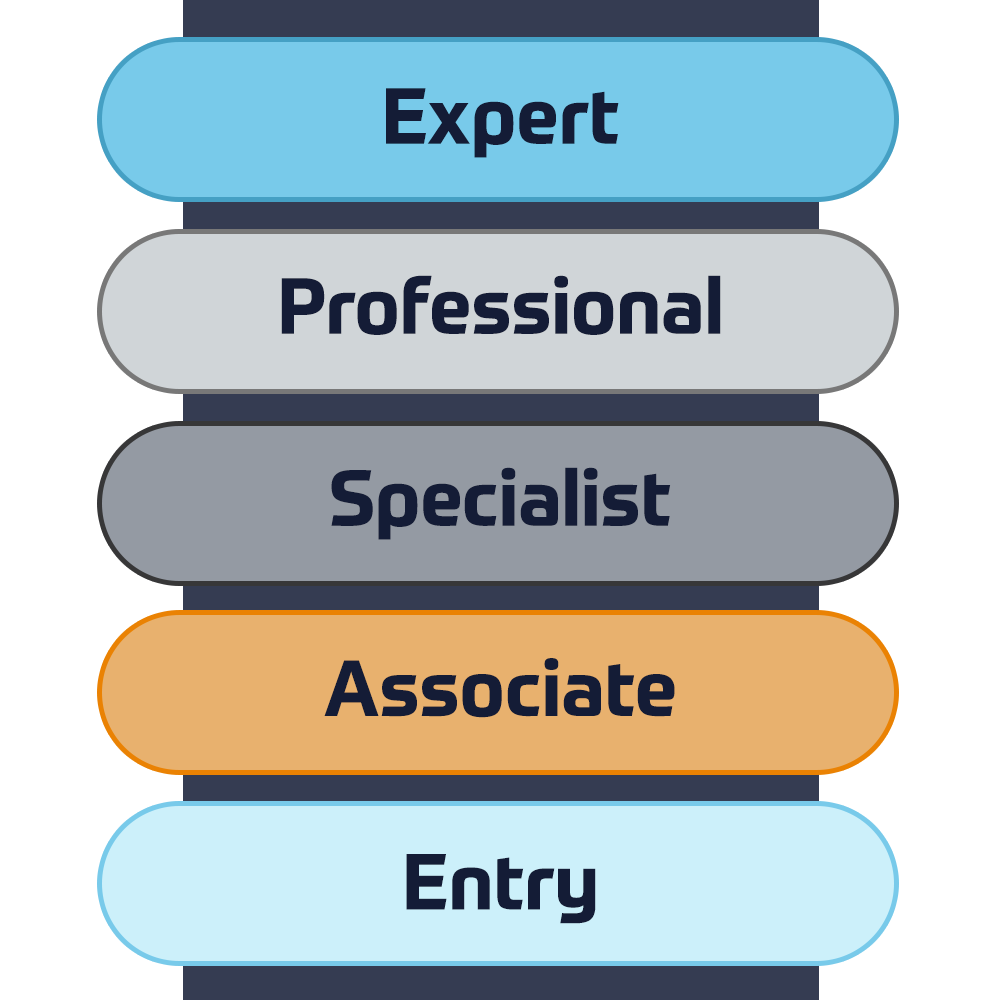
Sperimenta un approccio di apprendimento misto che combina il meglio della formazione con istruttore e dell'e-learning autogestito per aiutarti a prepararti per l'esame di certificazione.

Dettagli

Cisco Learning Credits

I Cisco Learning Credits (CLC) sono voucher di formazione prepagati riscattati direttamente con Cisco che semplificano la pianificazione del successo durante l'acquisto di prodotti e servizi Cisco.

Dettagli
Formazione Continua

The Cisco Continuing Education Program offers all active certification holders flexible options to recertify by completing a variety of eligible training items.

Dettagli

Cisco Digital Learning

Certified employees are VALUED assets. Explore Cisco official Digital Learning Library to educate yourself through recorded sessions.

Dettagli

Cisco Business Enablement

The Cisco Business Enablement Partner Program focuses on sharpening the business skills of Cisco Channel Partners and customers.

Dettagli
Catalogo Cisco

Dettagli

Certificazioni Fortinet

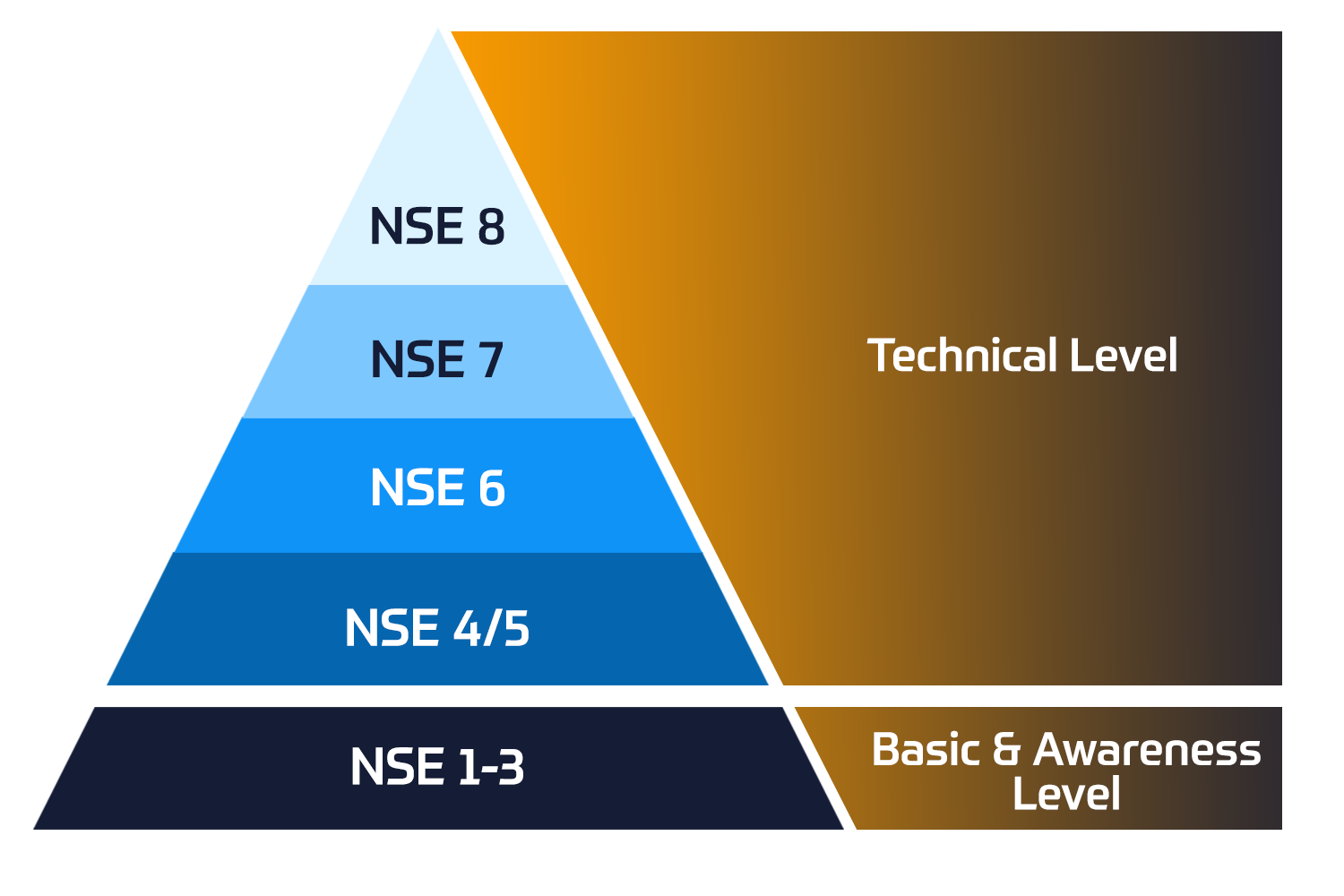
Il programma Fortinet Network Security Expert (NSE) è un programma di formazione e certificazione di otto livelli per insegnare agli ingegneri la sicurezza della loro rete per le competenze e l'esperienza di Fortinet FW.

Dettagli


Corsi di formazione tecnica

Insoft è riconosciuto come Fortinet Authorized Training Center in sedi selezionate in tutta l'EMEA.

Corsi tecnici

Catalogo Fortinet

Esplora un'ampia varietà di programmi Fortinet in diversi paesi e corsi online.

Dettagli

Stato ATC

Controlla il nostro stato ATC in tutti i paesi selezionati in Europa.

Dettagli

Fortinet Servizi Professionale

Il team riconosciuto a livello globale di esperti certificati ti aiuta a fare una transizione più fluida con i nostri pacchetti di consulenza, installazione e migrazione predefiniti per una vasta gamma di prodotti Fortinet.

Dettagli

Catalogo Microsoft

Insoft Services fornisce formazione Microsoft in EMEAR. Offriamo corsi di formazione tecnica e certificazione Microsoft guidati da istruttori di livello mondiale.

Corsi tecnici


Corsi di formazione

Impara conoscenze e abilità eccezionali di Extreme Networks.Find all the Extreme Networks online and instructor led class room based calendar here.

Corsi tecnici

Certificazioni Extreme

Forniamo un curriculum completo di competenze tecniche sul conseguimento della certificazione.

Dettagli

Catalogo Extreme

Dettagli

Accreditamento ATP

In qualità di partner di formazione autorizzato (ATP), Insoft Services garantisce che tu riceva i più alti standard di istruzione disponibili.

Dettagli

Pacchetti di consulenza

Forniamo un supporto innovativo e avanzato per la progettazione, l'implementazione e l'ottimizzazione delle soluzioni IT.La nostra base di clienti comprende alcune delle più grandi telco a livello globale.

Soluzioni & Servizi

Il team riconosciuto a livello globale di esperti certificati ti aiuta a fare una transizione più fluida con i nostri pacchetti di consulenza, installazione e migrazione predefiniti per una vasta gamma di prodotti Fortinet.


Chi siamo

Insoft fornisce servizi di formazione e consulenza autorizzati per fornitori IP selezionati.Scopri come stiamo rivoluzionando il settore.

Dettagli


  • +39 02 8704 5199
  • Forcepoint Secure SD-WAN Administrator

    Duration
    3 Giorni
    Delivery
    Online
    Price
    Prezzo su richiesta

    In this Forcepoint Secure SD-WAN Administrator course, you will learn how to install, configure, administer, and support Forcepoint Secure SD-WAN. Through instructional content, demonstrations, and hands-on lab practice exercises, you will learn the requirements and recommendations to successfully deploy the product in a variety of network environments. You will also develop expertise in creating security rules and policies, managing users and authentication, configuring VPNs, traffic deep inspection, and performing common administration tasks including status monitoring and reporting.

    • Access the virtual training environment, class materials and lab environment.
    • Identify the components of the SMC and their roles.
    • Administer the SMC components and use them to manage and monitor SD-WAN Engines.
    • Configure security policies and access control.
    • Configure network address translation.
    • Implement deep inspection through policies and templates.
    • Implement alerting and notification.
    • Manage users and authentication.
    • Configure an SSL VPN portal.
    • Configure a site-to-site SD-WAN.
    • Manage log collection and storage.
    • Utilize monitoring, statistics, and reporting.
    • Employ policy management tools.
    • Generate diagnostic reports for troubleshooting.
    • Integrate SD-WAN with other Forcepoint solutions.
    • Perform basic troubleshooting of SD-WAN.
    • Install a single Engine

    Module 0: Introducing the Course

    • Introduction to the virtual training environment.


    Module 1: Exploring the Engine

    • List the benefits and differentiators of Secure SD-WAN.
    • Describe the Secure SD-WAN Engine and appliances.
    • Differentiate between virtual Engines and virtual appliances.
    • Describe at least one of the installation methods.
    • List the four common Secure SD-WAN deployments.


    Module 2: Reviewing the Secure SD-WAN Manager Console (SMC)

    • Describe the Secure SD-WAN Manager console and its key features.
    • Describe the Secure SD-WAN system architecture.
    • Identify the ports used for communication between the SMC components.
    • Explain the use of locations and contact addresses.
    • Explain the use of SMC Domains.


    Module 3: Getting Started with the Secure SD-WAN Manager Console (SMC)

    • Describe the management client and how it works.
    • Create system backups.
    • Describe the SMC high availability options.
    • Configure the SMC Administrator Access.
    • Apply configuration to Secure SD-WAN Engines.
    • Describe how logs work.


    Module 4: Reviewing Policies and Templates

    • Describe the types of Engine policies.
    • Define Engine policy templates.
    • Create an Engine policy hierarchy.
    • Describe the benefits of aliases and continue rules.


    Module 5: Configuring Access and NAT Rules

    • Explain how traffic is matched in access rules.
    • Explain the different types of access rules.
    • Describe the actions for processing traffic in access rules.
    • Explain the different types of NAT.
    • Configure NAT rules.


    Module 6: Introducing Traffic Inspection

    • Explain the difference between a service, service with protocol, and proxy.
    • Explain the enhanced access control methods.
    • Explain different ways to control applications.
    • List the detection methods used in the Engine Inspection.
    • Describe advanced evasion techniques (AETs) and normalization.
    • Describe TLS Inspection.
    • Configure Snort inspection on Engine.
    • List the Forcepoint and third-party products that integrate with Forcepoint Engine.


    Module 7: Setting up Inspection Policies

    • Explain how to send traffic for deep packet inspection.
    • Describe Forcepoint Engine situations and how to use them.
    • Define the different types of rules in the inspection policy.
    • Tune an inspection policy.


    Module 8: Detecting Malware and Filtering Files

    • List the different options for detecting malware.
    • Explain how to send traffic for malware detection.
    • Configure a file filtering policy.
    • Integrate Forcepoint Engine with a Forcepoint Data Loss Prevention (DLP) system.


    Module 9: Configuring Alerts and Notifications

    • Explain the alert escalation process in Forcepoint Secure SD-WAN.
    • Create an alert policy and alert chain to escalate an alert.


    Module 10: Managing Users and Authentication

    • Identify supported directory servers and authentication methods.
    • Explain the browser-based user authentication mechanism.
    • Configure user authentication.
    • Differentiate between user authentication and user identification.
    • Explain the difference between the Forcepoint UID and ECA.
    • Configure user behavior monitoring.


    Module 11: Configuring the SSL VPN Portal

    • List Engine Mobile VPN Access options.
    • Describe the SSL VPN Portal and the URL Rewrite translation method.
    • Configure an SSL VPN Portal.


    Module 12: Configuring SD-WAN

    • Define the terms used by the Forcepoint SD-WAN feature.
    • Explain how site-to-site SD-WANs work.
    • Describe Full Mesh, Star, and Hub site-to-site SD-WAN topologies.
    • List the SD-WAN features that Forcepoint Engine supports.
    • Configure a policy-based SD-WAN
    • Describe how route-based SD-WANs work.


    Module 13: Analyzing Logs

    • Describe the log entry types available in Forcepoint Secure SD-WAN.
    • Use the Management Client interface to interpret and analyze logs.
    • Configure and manage logs.
    • Create permanent filters.
    • Analyze how pruning filters affect log data.
    • Configure the log server to forward logs to third-party SIEM systems.
    • Describe the methods available for managing the space consumed by log data.


    Module 14: Utilizing Policy Tools

    • Describe the benefits of Policy Snapshots.
    • Search rules in a Secure SD-WAN policy.
    • Analyze policy structure and apply tools to optimize access rules.


    Module 15: Monitoring Activity and Generating Reports

    • Monitor the system and Engine activity.
    • Describe the use of overviews in the SMC user interface.
    • Configure and generate reports.
    • Monitor Application Health.


    Module 16: Introducing Troubleshooting Tools and Techniques

    • Explain the troubleshooting process.
    • Use the SMC for troubleshooting.
    • Explain how to collect diagnostics for Technical Support.
    • Resolve common SMC issues.
    • Explain how Engine packet processing works.


    Module 17: Installing a Single Engine

    • Describe Engine deployment options.
    • List features specific to single Engines.
    • Configure a single Engine in the SMC.
    • Configure an Engine for initial contact with the SMC.
    • Establish the trust between SMC and a newly installed Engine.
    • New and existing customers of Forcepoint Secure SD-WAN
    • System Administrators, Network Administrators, IT staff
    • Sales Engineers, Consultants, Implementation Specialists
    • Forcepoint channel partners and IT staff
    • Forcepoint Secure SD-WAN end users
    • General understanding of system administration and Internet services
    • Basic knowledge of networking and computer security concepts

    In this Forcepoint Secure SD-WAN Administrator course, you will learn how to install, configure, administer, and support Forcepoint Secure SD-WAN. Through instructional content, demonstrations, and hands-on lab practice exercises, you will learn the requirements and recommendations to successfully deploy the product in a variety of network environments. You will also develop expertise in creating security rules and policies, managing users and authentication, configuring VPNs, traffic deep inspection, and performing common administration tasks including status monitoring and reporting.

    • Access the virtual training environment, class materials and lab environment.
    • Identify the components of the SMC and their roles.
    • Administer the SMC components and use them to manage and monitor SD-WAN Engines.
    • Configure security policies and access control.
    • Configure network address translation.
    • Implement deep inspection through policies and templates.
    • Implement alerting and notification.
    • Manage users and authentication.
    • Configure an SSL VPN portal.
    • Configure a site-to-site SD-WAN.
    • Manage log collection and storage.
    • Utilize monitoring, statistics, and reporting.
    • Employ policy management tools.
    • Generate diagnostic reports for troubleshooting.
    • Integrate SD-WAN with other Forcepoint solutions.
    • Perform basic troubleshooting of SD-WAN.
    • Install a single Engine

    Module 0: Introducing the Course

    • Introduction to the virtual training environment.


    Module 1: Exploring the Engine

    • List the benefits and differentiators of Secure SD-WAN.
    • Describe the Secure SD-WAN Engine and appliances.
    • Differentiate between virtual Engines and virtual appliances.
    • Describe at least one of the installation methods.
    • List the four common Secure SD-WAN deployments.


    Module 2: Reviewing the Secure SD-WAN Manager Console (SMC)

    • Describe the Secure SD-WAN Manager console and its key features.
    • Describe the Secure SD-WAN system architecture.
    • Identify the ports used for communication between the SMC components.
    • Explain the use of locations and contact addresses.
    • Explain the use of SMC Domains.


    Module 3: Getting Started with the Secure SD-WAN Manager Console (SMC)

    • Describe the management client and how it works.
    • Create system backups.
    • Describe the SMC high availability options.
    • Configure the SMC Administrator Access.
    • Apply configuration to Secure SD-WAN Engines.
    • Describe how logs work.


    Module 4: Reviewing Policies and Templates

    • Describe the types of Engine policies.
    • Define Engine policy templates.
    • Create an Engine policy hierarchy.
    • Describe the benefits of aliases and continue rules.


    Module 5: Configuring Access and NAT Rules

    • Explain how traffic is matched in access rules.
    • Explain the different types of access rules.
    • Describe the actions for processing traffic in access rules.
    • Explain the different types of NAT.
    • Configure NAT rules.


    Module 6: Introducing Traffic Inspection

    • Explain the difference between a service, service with protocol, and proxy.
    • Explain the enhanced access control methods.
    • Explain different ways to control applications.
    • List the detection methods used in the Engine Inspection.
    • Describe advanced evasion techniques (AETs) and normalization.
    • Describe TLS Inspection.
    • Configure Snort inspection on Engine.
    • List the Forcepoint and third-party products that integrate with Forcepoint Engine.


    Module 7: Setting up Inspection Policies

    • Explain how to send traffic for deep packet inspection.
    • Describe Forcepoint Engine situations and how to use them.
    • Define the different types of rules in the inspection policy.
    • Tune an inspection policy.


    Module 8: Detecting Malware and Filtering Files

    • List the different options for detecting malware.
    • Explain how to send traffic for malware detection.
    • Configure a file filtering policy.
    • Integrate Forcepoint Engine with a Forcepoint Data Loss Prevention (DLP) system.


    Module 9: Configuring Alerts and Notifications

    • Explain the alert escalation process in Forcepoint Secure SD-WAN.
    • Create an alert policy and alert chain to escalate an alert.


    Module 10: Managing Users and Authentication

    • Identify supported directory servers and authentication methods.
    • Explain the browser-based user authentication mechanism.
    • Configure user authentication.
    • Differentiate between user authentication and user identification.
    • Explain the difference between the Forcepoint UID and ECA.
    • Configure user behavior monitoring.


    Module 11: Configuring the SSL VPN Portal

    • List Engine Mobile VPN Access options.
    • Describe the SSL VPN Portal and the URL Rewrite translation method.
    • Configure an SSL VPN Portal.


    Module 12: Configuring SD-WAN

    • Define the terms used by the Forcepoint SD-WAN feature.
    • Explain how site-to-site SD-WANs work.
    • Describe Full Mesh, Star, and Hub site-to-site SD-WAN topologies.
    • List the SD-WAN features that Forcepoint Engine supports.
    • Configure a policy-based SD-WAN
    • Describe how route-based SD-WANs work.


    Module 13: Analyzing Logs

    • Describe the log entry types available in Forcepoint Secure SD-WAN.
    • Use the Management Client interface to interpret and analyze logs.
    • Configure and manage logs.
    • Create permanent filters.
    • Analyze how pruning filters affect log data.
    • Configure the log server to forward logs to third-party SIEM systems.
    • Describe the methods available for managing the space consumed by log data.


    Module 14: Utilizing Policy Tools

    • Describe the benefits of Policy Snapshots.
    • Search rules in a Secure SD-WAN policy.
    • Analyze policy structure and apply tools to optimize access rules.


    Module 15: Monitoring Activity and Generating Reports

    • Monitor the system and Engine activity.
    • Describe the use of overviews in the SMC user interface.
    • Configure and generate reports.
    • Monitor Application Health.


    Module 16: Introducing Troubleshooting Tools and Techniques

    • Explain the troubleshooting process.
    • Use the SMC for troubleshooting.
    • Explain how to collect diagnostics for Technical Support.
    • Resolve common SMC issues.
    • Explain how Engine packet processing works.


    Module 17: Installing a Single Engine

    • Describe Engine deployment options.
    • List features specific to single Engines.
    • Configure a single Engine in the SMC.
    • Configure an Engine for initial contact with the SMC.
    • Establish the trust between SMC and a newly installed Engine.
    • New and existing customers of Forcepoint Secure SD-WAN
    • System Administrators, Network Administrators, IT staff
    • Sales Engineers, Consultants, Implementation Specialists
    • Forcepoint channel partners and IT staff
    • Forcepoint Secure SD-WAN end users
    • General understanding of system administration and Internet services
    • Basic knowledge of networking and computer security concepts
      Programma
      Data su richiesta

    Follow Up Courses

    Filtra
    • 3 Giorni
      Data su richiesta
      Price on Request
      Book Now
    • 5 Giorni
      Data su richiesta
      Price on Request
      Book Now
    • 5 Giorni
      Data su richiesta
      Price on Request
      Book Now
    • 3 Giorni
      Data su richiesta
      Price on Request
      Book Now
    • 4 Giorni
      Data su richiesta
      Price on Request
      Book Now
    • 3 Giorni
      Data su richiesta
      Price on Request
      Book Now
    • 3 Giorni
      Data su richiesta
      Price on Request
      Book Now
    • 5 Giorni
      Data su richiesta
      Price on Request
      Book Now

    Know someone who´d be interested in this course?
    Let them know...

    Use the hashtag #InsoftLearning to talk about this course and find students like you on social media.