

Cisco træning

Insoft Services er en af de få uddannelsesudbydere i EMEAR, der tilbyder hele spektret af Cisco-certificering og specialiseret teknologiuddannelse.

Lær hvordan

Cisco-certificeringer

Oplev en blandet læringsmetode, der kombinerer det bedste fra instruktørstyret træning og e-læring i eget tempo for at hjælpe dig med at forberede dig til din certificeringseksamen.

Lær hvordan

Cisco Learning Credits

Cisco Learning Credits (CLCs) er forudbetalte træningskuponer, der indløses direkte med Cisco, og som gør det nemmere at planlægge din succes, når du køber Cisco-produkter og -tjenester.

Lær hvordan

Cisco Efteruddannelse

Cisco Continuing Education Program tilbyder alle aktive certificeringsindehavere fleksible muligheder for at gencertificere ved at gennemføre en række kvalificerede træningselementer.

Lær hvordan

Cisco Digital Learning

Certificerede medarbejdere er VÆRDSATTE aktiver. Udforsk Ciscos officielle digitale læringsbibliotek for at uddanne dig selv gennem optagede sessioner.

Lær hvordan

Cisco Business Enablement

Cisco Business Enablement Partner Program fokuserer på at skærpe Cisco Channel Partners og kunders forretningsmæssige færdigheder.

Lær hvordan

Cisco kursuskatalog

Lær hvordan

Fortinet-certificeringer

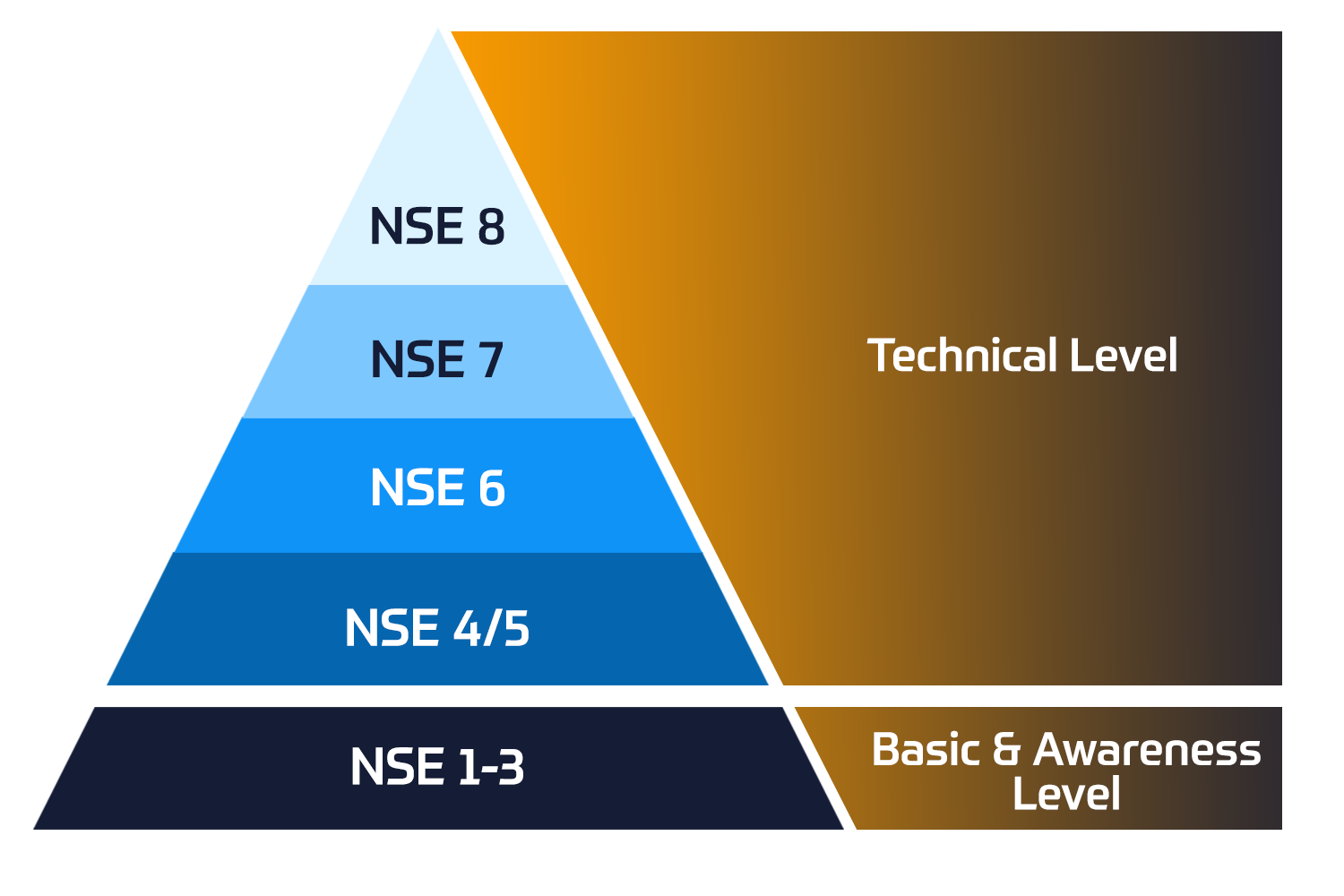
Fortinet Network Security Expert (NSE) -programmet er et otte-niveau uddannelses- og certificeringsprogram for at undervise ingeniører i deres netværkssikkerhed for Fortinet FW-færdigheder og erfaring.

Lær hvordan


Fortinet træning

Insoft er anerkendt som Autoriseret Fortinet Training Center på udvalgte steder på tværs af EMEA.

Tekniske kurser

Fortinet kursuskatalog

Udforsk hele Fortinet-træningskataloget. Programmet omfatter en bred vifte af selvstændige og instruktørledede kurser.

Lær hvordan

ATC-status

Tjek vores ATC-status på tværs af udvalgte lande i Europa.

Lær hvordan

Fortinet Professionelle Services

Globalt anerkendte team af certificerede eksperter hjælper dig med at gøre en mere jævn overgang med vores foruddefinerede konsulent-, installations- og migreringspakker til en lang række Fortinet-produkter.

Lær hvordan

AWS træning

Træningen inkluderer laboratorier i eget tempo til praktisk AWS-øvelse i virkelige scenarier, så du kan lære i dit eget tempo, i klassen, på arbejdet eller online.

Tekniske kurser


Extreme træning

Find all the Extreme Networks online and instructor led class room based calendar here.

Tekniske kurser


Tekniske certificeringer

Vi leverer omfattende læseplan for tekniske kompetencefærdigheder på certificeringspræstationen.

Lær hvordan

Extreme kursuskatalog

Lær hvordan

ATP-akkreditering

Som autoriseret uddannelsespartner (ATP) sikrer Insoft Services, at du får de højeste uddannelsesstandarder, der findes.

Lær hvordan

Løsninger og tjenester

Vi leverer innovativ og avanceret support til design, implementering og optimering af IT-løsninger. Vores kundebase omfatter nogle af de største Telcos globalt.

Lær hvordan

Globalt anerkendte team af certificerede eksperter hjælper dig med at gøre en mere jævn overgang med vores foruddefinerede konsulent-, installations- og migreringspakker til en lang række Fortinet-produkter.


Om os

Insoft tilbyder autoriseret uddannelses- og konsulentbistand til udvalgte IP-leverandører. Få mere at vide om, hvordan vi revolutionerer branchen.

Lær hvordan


  • +45 32 70 99 90
  • FortiMail Workspace Security Administrator

    Duration
    1 Dage (8 hours/day)
    2 Dage (half day sessions)
    Delivery
    (Online Og På stedet)
    Price
    Pris på forespørgsel

    In this course, you will learn how to onboard and protect Google Workspace and Microsoft 365 services. You will learn about organizations and multi-tenancy, and learn how to view and filter scans, configure scan controls, and analyze verdicts. You will also learn how to implement browser security and protection for collaboration applications.

    Product Versions:

    • FortiMail Workspace Security 26

    Exam:

    • This course prepares you for the NSE6 - FortiMail Workspace Security Administrator exam.

    Associated Certification:

    After completing this course, you will be able to:

    • Explain FortiMail Workspace Security
    • Describe FortiMail Workspace licenses
    • Configure Google Workspace
    • Configure Microsoft 365
    • Configure additional email services
    • Configure administrator users and profiles
    • Configure VIP users
    • Configure banners
    • Describe organizational hierarchy
    • Configure an organization
    • Describe organization types
    • Manage organizations
    • Describe the precedence of allowlists and blocklists
    • Configure allowlists and blocklists
    • Configure email alerts
    • View audit logs
    • Monitor service status and feature updates
    • View and filter scans
    • Configure and generate periodic reports
    • View detected incidents
    • Manage FortiMail Workspace Security events
    • Configure remote logging
    • Manage FortiMail Browser Security
    • Deploy and manage extensions
    • Configure and manage policies
    • Configure advanced features
    • Integrate channels
    • Integrate EDR tools
    • Troubleshoot scans
    • Analyze error messages
    • Troubleshoot the browser extension
    • Introduction and Onboarding
    • System Settings
    • Workspace Security
    • Browser Security
    • Integrating Channels and Troubleshooting

    Security professionals involved in the day-to-day administration of a FortiMail Workspace Security platform should attend this course.

    You must have a basic understanding of network and email security concepts.

    In this course, you will learn how to onboard and protect Google Workspace and Microsoft 365 services. You will learn about organizations and multi-tenancy, and learn how to view and filter scans, configure scan controls, and analyze verdicts. You will also learn how to implement browser security and protection for collaboration applications.

    Product Versions:

    • FortiMail Workspace Security 26

    Exam:

    • This course prepares you for the NSE6 - FortiMail Workspace Security Administrator exam.

    Associated Certification:

    After completing this course, you will be able to:

    • Explain FortiMail Workspace Security
    • Describe FortiMail Workspace licenses
    • Configure Google Workspace
    • Configure Microsoft 365
    • Configure additional email services
    • Configure administrator users and profiles
    • Configure VIP users
    • Configure banners
    • Describe organizational hierarchy
    • Configure an organization
    • Describe organization types
    • Manage organizations
    • Describe the precedence of allowlists and blocklists
    • Configure allowlists and blocklists
    • Configure email alerts
    • View audit logs
    • Monitor service status and feature updates
    • View and filter scans
    • Configure and generate periodic reports
    • View detected incidents
    • Manage FortiMail Workspace Security events
    • Configure remote logging
    • Manage FortiMail Browser Security
    • Deploy and manage extensions
    • Configure and manage policies
    • Configure advanced features
    • Integrate channels
    • Integrate EDR tools
    • Troubleshoot scans
    • Analyze error messages
    • Troubleshoot the browser extension
    • Introduction and Onboarding
    • System Settings
    • Workspace Security
    • Browser Security
    • Integrating Channels and Troubleshooting

    Security professionals involved in the day-to-day administration of a FortiMail Workspace Security platform should attend this course.

    You must have a basic understanding of network and email security concepts.

      Kommende datoer
    • ` 24 Aug, 2026
    • ` 21 Sep, 2026
    • ` 19 Oct, 2026
    • ` 16 Nov, 2026
    • ` 14 Dec, 2026
    • ` 11 Jan, 2027

    Follow Up Courses

    Filtrer
    • 1 Dag

      24 Aug, 2026

      21 Sep, 2026

      19 Oct, 2026

      16 Nov, 2026

      14 Dec, 2026

      11 Jan, 2027

      Price on Request
      Book Now
    • 2 Dage

      13 Aug - 14 Aug, 2026

      28 Sep - 29 Sep, 2026

      22 Oct - 23 Oct, 2026

      16 Nov - 17 Nov, 2026

      3 Dec - 4 Dec, 2026

      31 Dec - 1 Jan, 2027

      Price on Request
      Book Now
    • 3 Dage

      10 Aug - 12 Aug, 2026

      7 Sep - 9 Sep, 2026

      5 Oct - 7 Oct, 2026

      2 Nov - 4 Nov, 2026

      30 Nov - 2 Dec, 2026

      28 Dec - 30 Dec, 2026

      Price on Request
      Book Now
    • 2 Dage

      10 Aug - 11 Aug, 2026

      7 Sep - 8 Sep, 2026

      5 Oct - 6 Oct, 2026

      2 Nov - 3 Nov, 2026

      30 Nov - 1 Dec, 2026

      28 Dec - 29 Dec, 2026

      Price on Request
      Book Now
    • 3 Dage

      4 Aug - 6 Aug, 2026

      1 Sep - 3 Sep, 2026

      29 Sep - 1 Oct, 2026

      27 Oct - 29 Oct, 2026

      24 Nov - 26 Nov, 2026

      22 Dec - 24 Dec, 2026

      Price on Request
      Book Now
    • 1 Dag

      17 Aug, 2026

      14 Sep, 2026

      12 Oct, 2026

      9 Nov, 2026

      7 Dec, 2026

      4 Jan, 2027

      Price on Request
      Book Now
    • 3 Dage

      5 Aug - 7 Aug, 2026

      2 Sep - 4 Sep, 2026

      30 Sep - 2 Oct, 2026

      28 Oct - 30 Oct, 2026

      25 Nov - 27 Nov, 2026

      23 Dec - 25 Dec, 2026

      Price on Request
      Book Now
    • 3 Dage

      10 Aug - 12 Aug, 2026

      7 Sep - 9 Sep, 2026

      5 Oct - 7 Oct, 2026

      2 Nov - 4 Nov, 2026

      30 Nov - 2 Dec, 2026

      28 Dec - 30 Dec, 2026

      Price on Request
      Book Now
    • 2 Dage

      10 Aug - 11 Aug, 2026

      7 Sep - 8 Sep, 2026

      5 Oct - 6 Oct, 2026

      2 Nov - 3 Nov, 2026

      30 Nov - 1 Dec, 2026

      28 Dec - 29 Dec, 2026

      Price on Request
      Book Now
    • 1 Dag

      6 Aug, 2026

      3 Sep, 2026

      1 Oct, 2026

      29 Oct, 2026

      26 Nov, 2026

      24 Dec, 2026

      Price on Request
      Book Now

    Know someone who´d be interested in this course?
    Let them know...

    Use the hashtag #InsoftLearning to talk about this course and find students like you on social media.