

Cisco-Ausbildung

Insoft Services ist einer der wenigen Schulungsanbieter in EMEAR, der ein umfassendes Angebot an Cisco-Zertifizierungen und spezialisierten Technologieschulungen anbietet.

Lesen Sie mehr

Cisco Zertifizierungen

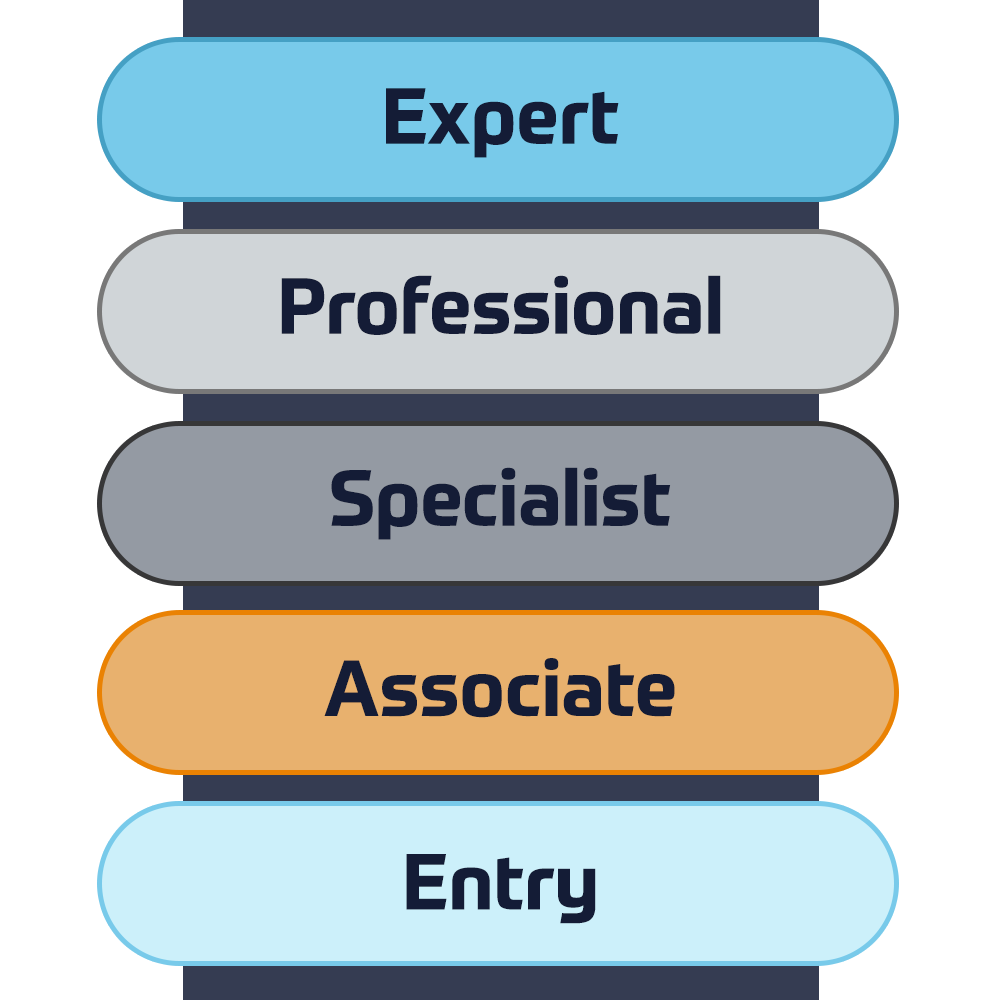
Erleben Sie einen Blended-Learning-Ansatz, der das Beste aus von Lehrern geleiteten Schulungen und E-Learning zum Selbststudium kombiniert, um sich auf Ihre Zertifizierungsprüfung vorzubereiten.

Lesen Sie mehr

Cisco Learning Credits

Cisco Learning Credits (CLCs) sind Prepaid-Schulungsgutscheine, die direkt bei Cisco eingelöst werden und die Planung für Ihren Erfolg beim Kauf von Cisco-Produkten und -Services erleichtern.

Lösen Sie Ihre CLCs ein
Cisco Continuing Education

Das Cisco Continuing Education Program bietet allen aktiven Zertifizierungsinhabern flexible Optionen zur Rezertifizierung, indem sie eine Vielzahl von in Frage kommenden Schulungselementen absolvieren.

Lesen Sie mehr

Cisco Digital Learning

Zertifizierte Mitarbeiter sind GESCHÄTZTE Vermögenswerte. Erkunden Sie die offizielle Digital Learning Library von Cisco, um sich durch aufgezeichnete Sitzungen weiterzubilden.

CDLL-Katalog

Cisco Business Enablement

Das Cisco Business Enablement Partner Program konzentriert sich auf die Verbesserung der Geschäftsfähigkeiten von Cisco Channel Partnern und Kunden.

Lesen Sie mehr
Cisco Schulungskatalog

Lesen Sie mehr

Technische Zertifizierung

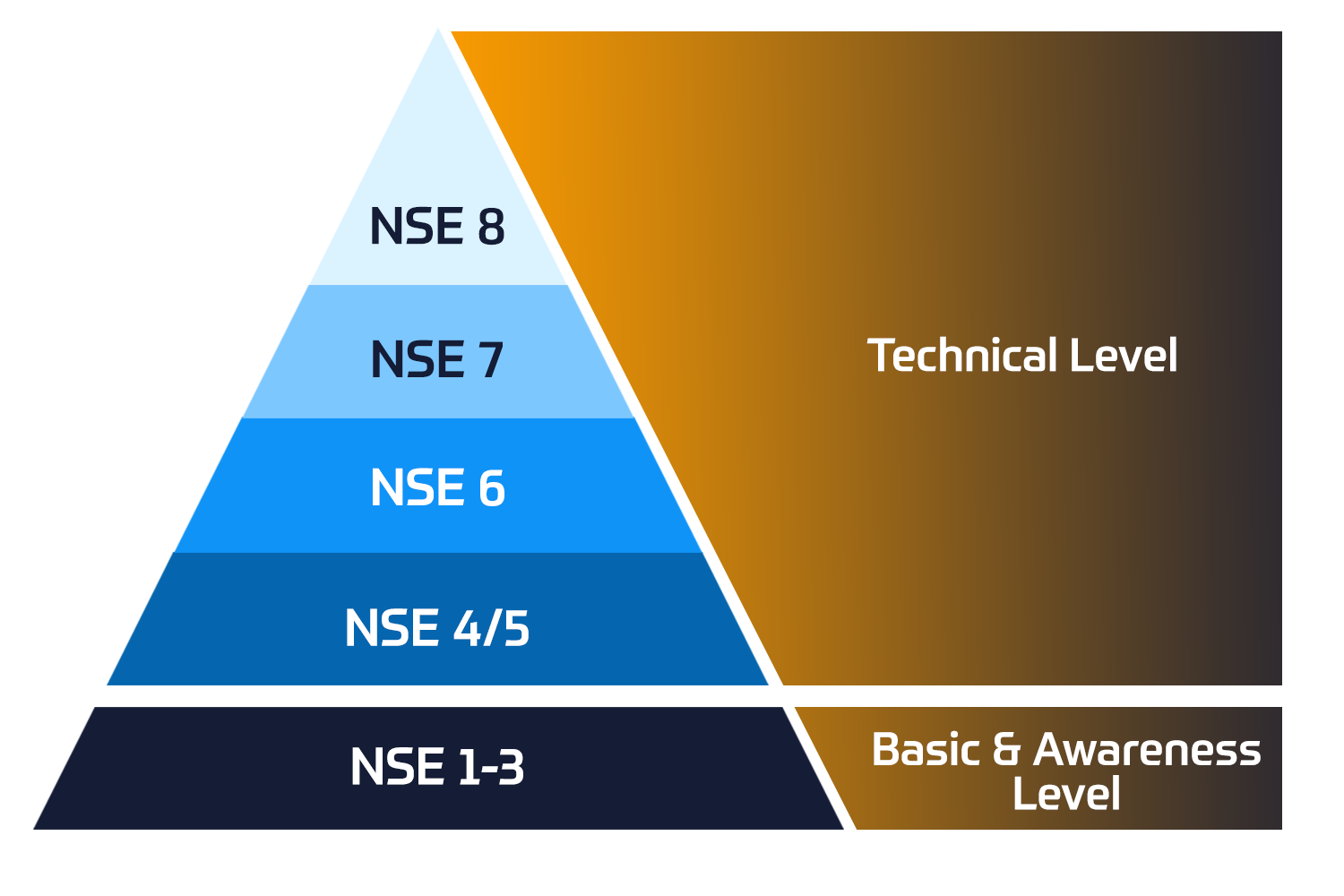
Das Fortinet Network Security Expert (NSE) -Programm ist ein achtstufiges Schulungs- und Zertifizierungsprogramm, um Ingenieuren ihre Netzwerksicherheit für Fortinet FW-Fähigkeiten und -Erfahrungen beizubringen.

Technische Kurse


Fortinet-Ausbildung

Insoft ist als Fortinet Authorized Training Center an ausgewählten Standorten in EMEA anerkannt.

Lesen Sie mehr

Fortinet Schulungskatalog

Lesen Sie mehr

ATC Status

Überprüfen Sie unseren ATC-Status in ausgewählten Ländern in Europa.

Lesen Sie mehr

Fortinet Service-Pakete

Insoft Services hat eine spezielle Lösung entwickelt, um den Prozess der Installation oder Migration zu Fortinet-Produkten zu rationalisieren und zu vereinfachen.

Lesen Sie mehr

Microsoft-Ausbildung

Insoft Services bietet Microsoft-Schulungen in EMEAR an. Wir bieten technische Schulungen und Zertifizierungskurse von Microsoft an, die von erstklassigen Instruktoren geleitet werden.

Technische Kurse


Extreme-Ausbildung

Erfahren Sie außergewöhnliche Kenntnisse und Fähigkeiten von Extreme Networks.

Technische Kurse

Technische Zertifizierung

Wir bieten einen umfassenden Lehrplan für technische Kompetenzen zur Zertifizierung an.

Lesen Sie mehr

Extreme Schulungskatalog

Hier finden Sie alle Extreme Networks online und den von Lehrern geleiteten Kalender für den Klassenraum.

Lesen Sie mehr

ATP-Akkreditierung

Als autorisierter Schulungspartner (ATP) stellt Insoft Services sicher, dass Sie die höchsten verfügbaren Bildungsstandards erhalten.

Lesen Sie mehr

Lösungen & Dienstleistungen

Wir bieten innovative und fortschrittliche Unterstützung bei der Konzeption, Implementierung und Optimierung von IT-Lösungen. Unsere Kundenbasis umfasst einige der größten Telcos weltweit.

Beratungspakete

Ein weltweit anerkanntes Team von zertifizierten Experten unterstützt Sie bei einem reibungsloseren Übergang mit unseren vordefinierten Beratungs-, Installations- und Migrationspaketen für eine breite Palette von Fortinet-Produkten.


Über uns

Insoft bietet autorisierte Schulungs- und Beratungsdienstleistungen für ausgewählte IP-Anbieter. Erfahren Sie, wie wir die Branche revolutionieren.

Lesen Sie mehr


  • +49 6151 277 6496
  • Forcepoint Secure SD-WAN Administrator

    Duration
    3 Tage
    Delivery
    Online
    Price
    Preis auf Anfrage

    In this Forcepoint Secure SD-WAN Administrator course, you will learn how to install, configure, administer, and support Forcepoint Secure SD-WAN. Through instructional content, demonstrations, and hands-on lab practice exercises, you will learn the requirements and recommendations to successfully deploy the product in a variety of network environments. You will also develop expertise in creating security rules and policies, managing users and authentication, configuring VPNs, traffic deep inspection, and performing common administration tasks including status monitoring and reporting.

    • Access the virtual training environment, class materials and lab environment.
    • Identify the components of the SMC and their roles.
    • Administer the SMC components and use them to manage and monitor SD-WAN Engines.
    • Configure security policies and access control.
    • Configure network address translation.
    • Implement deep inspection through policies and templates.
    • Implement alerting and notification.
    • Manage users and authentication.
    • Configure an SSL VPN portal.
    • Configure a site-to-site SD-WAN.
    • Manage log collection and storage.
    • Utilize monitoring, statistics, and reporting.
    • Employ policy management tools.
    • Generate diagnostic reports for troubleshooting.
    • Integrate SD-WAN with other Forcepoint solutions.
    • Perform basic troubleshooting of SD-WAN.
    • Install a single Engine

    Module 0: Introducing the Course

    • Introduction to the virtual training environment.


    Module 1: Exploring the Engine

    • List the benefits and differentiators of Secure SD-WAN.
    • Describe the Secure SD-WAN Engine and appliances.
    • Differentiate between virtual Engines and virtual appliances.
    • Describe at least one of the installation methods.
    • List the four common Secure SD-WAN deployments.


    Module 2: Reviewing the Secure SD-WAN Manager Console (SMC)

    • Describe the Secure SD-WAN Manager console and its key features.
    • Describe the Secure SD-WAN system architecture.
    • Identify the ports used for communication between the SMC components.
    • Explain the use of locations and contact addresses.
    • Explain the use of SMC Domains.


    Module 3: Getting Started with the Secure SD-WAN Manager Console (SMC)

    • Describe the management client and how it works.
    • Create system backups.
    • Describe the SMC high availability options.
    • Configure the SMC Administrator Access.
    • Apply configuration to Secure SD-WAN Engines.
    • Describe how logs work.


    Module 4: Reviewing Policies and Templates

    • Describe the types of Engine policies.
    • Define Engine policy templates.
    • Create an Engine policy hierarchy.
    • Describe the benefits of aliases and continue rules.


    Module 5: Configuring Access and NAT Rules

    • Explain how traffic is matched in access rules.
    • Explain the different types of access rules.
    • Describe the actions for processing traffic in access rules.
    • Explain the different types of NAT.
    • Configure NAT rules.


    Module 6: Introducing Traffic Inspection

    • Explain the difference between a service, service with protocol, and proxy.
    • Explain the enhanced access control methods.
    • Explain different ways to control applications.
    • List the detection methods used in the Engine Inspection.
    • Describe advanced evasion techniques (AETs) and normalization.
    • Describe TLS Inspection.
    • Configure Snort inspection on Engine.
    • List the Forcepoint and third-party products that integrate with Forcepoint Engine.


    Module 7: Setting up Inspection Policies

    • Explain how to send traffic for deep packet inspection.
    • Describe Forcepoint Engine situations and how to use them.
    • Define the different types of rules in the inspection policy.
    • Tune an inspection policy.


    Module 8: Detecting Malware and Filtering Files

    • List the different options for detecting malware.
    • Explain how to send traffic for malware detection.
    • Configure a file filtering policy.
    • Integrate Forcepoint Engine with a Forcepoint Data Loss Prevention (DLP) system.


    Module 9: Configuring Alerts and Notifications

    • Explain the alert escalation process in Forcepoint Secure SD-WAN.
    • Create an alert policy and alert chain to escalate an alert.


    Module 10: Managing Users and Authentication

    • Identify supported directory servers and authentication methods.
    • Explain the browser-based user authentication mechanism.
    • Configure user authentication.
    • Differentiate between user authentication and user identification.
    • Explain the difference between the Forcepoint UID and ECA.
    • Configure user behavior monitoring.


    Module 11: Configuring the SSL VPN Portal

    • List Engine Mobile VPN Access options.
    • Describe the SSL VPN Portal and the URL Rewrite translation method.
    • Configure an SSL VPN Portal.


    Module 12: Configuring SD-WAN

    • Define the terms used by the Forcepoint SD-WAN feature.
    • Explain how site-to-site SD-WANs work.
    • Describe Full Mesh, Star, and Hub site-to-site SD-WAN topologies.
    • List the SD-WAN features that Forcepoint Engine supports.
    • Configure a policy-based SD-WAN
    • Describe how route-based SD-WANs work.


    Module 13: Analyzing Logs

    • Describe the log entry types available in Forcepoint Secure SD-WAN.
    • Use the Management Client interface to interpret and analyze logs.
    • Configure and manage logs.
    • Create permanent filters.
    • Analyze how pruning filters affect log data.
    • Configure the log server to forward logs to third-party SIEM systems.
    • Describe the methods available for managing the space consumed by log data.


    Module 14: Utilizing Policy Tools

    • Describe the benefits of Policy Snapshots.
    • Search rules in a Secure SD-WAN policy.
    • Analyze policy structure and apply tools to optimize access rules.


    Module 15: Monitoring Activity and Generating Reports

    • Monitor the system and Engine activity.
    • Describe the use of overviews in the SMC user interface.
    • Configure and generate reports.
    • Monitor Application Health.


    Module 16: Introducing Troubleshooting Tools and Techniques

    • Explain the troubleshooting process.
    • Use the SMC for troubleshooting.
    • Explain how to collect diagnostics for Technical Support.
    • Resolve common SMC issues.
    • Explain how Engine packet processing works.


    Module 17: Installing a Single Engine

    • Describe Engine deployment options.
    • List features specific to single Engines.
    • Configure a single Engine in the SMC.
    • Configure an Engine for initial contact with the SMC.
    • Establish the trust between SMC and a newly installed Engine.
    • New and existing customers of Forcepoint Secure SD-WAN
    • System Administrators, Network Administrators, IT staff
    • Sales Engineers, Consultants, Implementation Specialists
    • Forcepoint channel partners and IT staff
    • Forcepoint Secure SD-WAN end users
    • General understanding of system administration and Internet services
    • Basic knowledge of networking and computer security concepts

    In this Forcepoint Secure SD-WAN Administrator course, you will learn how to install, configure, administer, and support Forcepoint Secure SD-WAN. Through instructional content, demonstrations, and hands-on lab practice exercises, you will learn the requirements and recommendations to successfully deploy the product in a variety of network environments. You will also develop expertise in creating security rules and policies, managing users and authentication, configuring VPNs, traffic deep inspection, and performing common administration tasks including status monitoring and reporting.

    • Access the virtual training environment, class materials and lab environment.
    • Identify the components of the SMC and their roles.
    • Administer the SMC components and use them to manage and monitor SD-WAN Engines.
    • Configure security policies and access control.
    • Configure network address translation.
    • Implement deep inspection through policies and templates.
    • Implement alerting and notification.
    • Manage users and authentication.
    • Configure an SSL VPN portal.
    • Configure a site-to-site SD-WAN.
    • Manage log collection and storage.
    • Utilize monitoring, statistics, and reporting.
    • Employ policy management tools.
    • Generate diagnostic reports for troubleshooting.
    • Integrate SD-WAN with other Forcepoint solutions.
    • Perform basic troubleshooting of SD-WAN.
    • Install a single Engine

    Module 0: Introducing the Course

    • Introduction to the virtual training environment.


    Module 1: Exploring the Engine

    • List the benefits and differentiators of Secure SD-WAN.
    • Describe the Secure SD-WAN Engine and appliances.
    • Differentiate between virtual Engines and virtual appliances.
    • Describe at least one of the installation methods.
    • List the four common Secure SD-WAN deployments.


    Module 2: Reviewing the Secure SD-WAN Manager Console (SMC)

    • Describe the Secure SD-WAN Manager console and its key features.
    • Describe the Secure SD-WAN system architecture.
    • Identify the ports used for communication between the SMC components.
    • Explain the use of locations and contact addresses.
    • Explain the use of SMC Domains.


    Module 3: Getting Started with the Secure SD-WAN Manager Console (SMC)

    • Describe the management client and how it works.
    • Create system backups.
    • Describe the SMC high availability options.
    • Configure the SMC Administrator Access.
    • Apply configuration to Secure SD-WAN Engines.
    • Describe how logs work.


    Module 4: Reviewing Policies and Templates

    • Describe the types of Engine policies.
    • Define Engine policy templates.
    • Create an Engine policy hierarchy.
    • Describe the benefits of aliases and continue rules.


    Module 5: Configuring Access and NAT Rules

    • Explain how traffic is matched in access rules.
    • Explain the different types of access rules.
    • Describe the actions for processing traffic in access rules.
    • Explain the different types of NAT.
    • Configure NAT rules.


    Module 6: Introducing Traffic Inspection

    • Explain the difference between a service, service with protocol, and proxy.
    • Explain the enhanced access control methods.
    • Explain different ways to control applications.
    • List the detection methods used in the Engine Inspection.
    • Describe advanced evasion techniques (AETs) and normalization.
    • Describe TLS Inspection.
    • Configure Snort inspection on Engine.
    • List the Forcepoint and third-party products that integrate with Forcepoint Engine.


    Module 7: Setting up Inspection Policies

    • Explain how to send traffic for deep packet inspection.
    • Describe Forcepoint Engine situations and how to use them.
    • Define the different types of rules in the inspection policy.
    • Tune an inspection policy.


    Module 8: Detecting Malware and Filtering Files

    • List the different options for detecting malware.
    • Explain how to send traffic for malware detection.
    • Configure a file filtering policy.
    • Integrate Forcepoint Engine with a Forcepoint Data Loss Prevention (DLP) system.


    Module 9: Configuring Alerts and Notifications

    • Explain the alert escalation process in Forcepoint Secure SD-WAN.
    • Create an alert policy and alert chain to escalate an alert.


    Module 10: Managing Users and Authentication

    • Identify supported directory servers and authentication methods.
    • Explain the browser-based user authentication mechanism.
    • Configure user authentication.
    • Differentiate between user authentication and user identification.
    • Explain the difference between the Forcepoint UID and ECA.
    • Configure user behavior monitoring.


    Module 11: Configuring the SSL VPN Portal

    • List Engine Mobile VPN Access options.
    • Describe the SSL VPN Portal and the URL Rewrite translation method.
    • Configure an SSL VPN Portal.


    Module 12: Configuring SD-WAN

    • Define the terms used by the Forcepoint SD-WAN feature.
    • Explain how site-to-site SD-WANs work.
    • Describe Full Mesh, Star, and Hub site-to-site SD-WAN topologies.
    • List the SD-WAN features that Forcepoint Engine supports.
    • Configure a policy-based SD-WAN
    • Describe how route-based SD-WANs work.


    Module 13: Analyzing Logs

    • Describe the log entry types available in Forcepoint Secure SD-WAN.
    • Use the Management Client interface to interpret and analyze logs.
    • Configure and manage logs.
    • Create permanent filters.
    • Analyze how pruning filters affect log data.
    • Configure the log server to forward logs to third-party SIEM systems.
    • Describe the methods available for managing the space consumed by log data.


    Module 14: Utilizing Policy Tools

    • Describe the benefits of Policy Snapshots.
    • Search rules in a Secure SD-WAN policy.
    • Analyze policy structure and apply tools to optimize access rules.


    Module 15: Monitoring Activity and Generating Reports

    • Monitor the system and Engine activity.
    • Describe the use of overviews in the SMC user interface.
    • Configure and generate reports.
    • Monitor Application Health.


    Module 16: Introducing Troubleshooting Tools and Techniques

    • Explain the troubleshooting process.
    • Use the SMC for troubleshooting.
    • Explain how to collect diagnostics for Technical Support.
    • Resolve common SMC issues.
    • Explain how Engine packet processing works.


    Module 17: Installing a Single Engine

    • Describe Engine deployment options.
    • List features specific to single Engines.
    • Configure a single Engine in the SMC.
    • Configure an Engine for initial contact with the SMC.
    • Establish the trust between SMC and a newly installed Engine.
    • New and existing customers of Forcepoint Secure SD-WAN
    • System Administrators, Network Administrators, IT staff
    • Sales Engineers, Consultants, Implementation Specialists
    • Forcepoint channel partners and IT staff
    • Forcepoint Secure SD-WAN end users
    • General understanding of system administration and Internet services
    • Basic knowledge of networking and computer security concepts
      Termine
      Datum auf Anfrage

    Follow Up Courses

    Filter
    • 3 Tage
      Datum auf Anfrage
      Price on Request
      Book Now
    • 5 Tage
      Datum auf Anfrage
      Price on Request
      Book Now
    • 5 Tage
      Datum auf Anfrage
      Price on Request
      Book Now
    • 3 Tage
      Datum auf Anfrage
      Price on Request
      Book Now
    • 4 Tage
      Datum auf Anfrage
      Price on Request
      Book Now
    • 3 Tage
      Datum auf Anfrage
      Price on Request
      Book Now
    • 3 Tage
      Datum auf Anfrage
      Price on Request
      Book Now
    • 5 Tage
      Datum auf Anfrage
      Price on Request
      Book Now

    Know someone who´d be interested in this course?
    Let them know...

    Use the hashtag #InsoftLearning to talk about this course and find students like you on social media.